ReddRadar

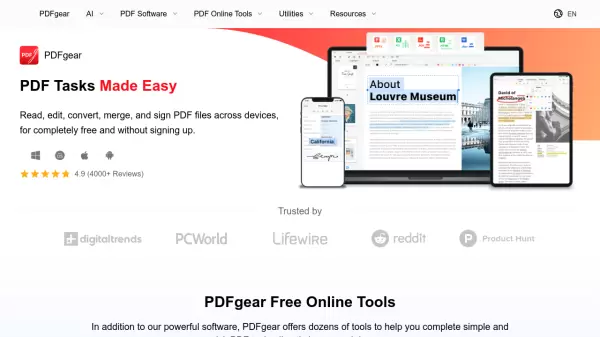
What is PDFgear?
PDFgear stands out as a versatile PDF management solution that combines powerful desktop software with convenient online tools. The platform leverages cutting-edge AI technology to enhance productivity and streamline document workflows across Windows, Mac, iOS, and Android devices.
The software provides enterprise-level PDF management capabilities including advanced editing, annotation, conversion, and OCR functionality supporting over 30 languages. Notable is its integration of AI features for document analysis and summarization, making it a comprehensive solution for both personal and business use.
Features
- AI-Powered Analysis: Built-in ChatGPT for document summarization and information extraction
- Cross-Platform Compatibility: Available on Windows, Mac, iOS, and Android
- Advanced PDF Editing: Text, images, shapes, signatures, and form field editing
- Document Conversion: Convert between PDF and various formats including Word, TXT, JPG, Excel, PPT
- OCR Technology: Support for 30+ languages in text extraction and conversion
- Annotation Tools: Highlighting, underlining, comments, stamps, and shape insertion
- Cloud Integration: Seamless document management across devices
- Batch Processing: Support for multiple file conversions
Use Cases
- Document editing and management
- PDF format conversion
- Digital document signing
- Form filling and creation
- Document annotation and review
- Document summarization and analysis
- Batch file processing
- Document scanning and OCR
FAQs
-
Why is PDFgear completely free?
PDFgear offers its services for free as part of their vision to empower everyone to manage PDFs without cost while maintaining enterprise-level functionality. -
What languages does the OCR feature support?
PDFgear's OCR functionality supports more than 30 languages for text extraction and conversion. -
Can I use PDFgear without an internet connection?
Yes, PDFgear offers offline functionality through its desktop applications for Windows and Mac.