ReddRadar


What is TaxLens?
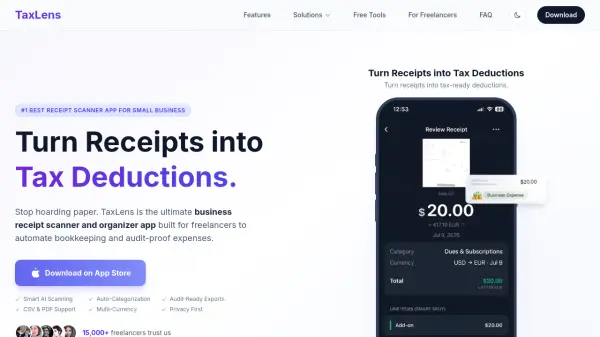
TaxLens is an AI-powered receipt scanner and organizer app specifically built for freelancers, contractors, and small business owners who need efficient expense tracking and tax compliance. The app uses advanced AI technology to automatically extract merchant information, dates, totals, and tax amounts from receipts in seconds, eliminating manual data entry and reducing the risk of missed deductions.
The platform goes beyond basic receipt scanning by intelligently categorizing expenses as business or personal, applying tax rules automatically, and generating accountant-ready PDF reports with attached receipt images. With multi-currency support for over 30 currencies, secure on-device or iCloud storage, and seamless CSV export compatibility with QuickBooks and Excel, TaxLens provides a comprehensive solution for tax-compliant expense management. The app features batch scanning capabilities, tax insights dashboard showing potential savings, and confidence scoring to flag items requiring review, making tax season stress-free for self-employed professionals.
Features
- Smart AI Receipt Scanning: Automatically extracts merchant, date, totals, and tax information in seconds with batch scanning up to 20 receipts
- Tax-Ready Categorization: AI distinguishes between business and personal expenses with confidence scoring to flag items for review
- Accountant-Ready Reports: Generate professional PDF audit packets with receipt images and CSV exports for accounting software
- Multi-Currency Support: Auto-detects 30+ currencies and converts amounts using historical exchange rates based on receipt date
- Tax Insights Dashboard: Visual breakdowns showing total spent, total deductible, and estimated tax savings at a glance
- Secure Receipt Vault: Private on-device or iCloud storage with no ads or data selling, ensuring complete privacy
- Batch Processing: Import receipts from Photos or scan multiple receipts simultaneously for faster processing
- QuickBooks Integration: Export categorized expenses as CSV files compatible with QuickBooks, Excel, and other accounting software
Use Cases
- Freelancers tracking business expenses and maximizing tax deductions throughout the year
- Small business owners organizing hundreds of weekly receipts for accurate bookkeeping
- Consultants preparing audit-ready expense reports for accountants and tax professionals
- International travelers managing multi-currency expenses with automatic conversion
- Self-employed professionals separating personal and business expenses for tax compliance
- Contractors preparing documentation for IRS audits with comprehensive PDF reports
- Restaurant owners managing high-volume receipt processing including faded thermal paper
- Digital nomads tracking expenses across multiple currencies for accurate tax filing
How It Works
Snap Your Receipt
Take a photo of your receipt using the TaxLens app or import from your Photos. Batch scan up to 20 receipts at once for faster processing.
AI Auto-Categorizes
The AI automatically extracts merchant, date, totals, tax amounts, and categorizes the expense as business or personal based on tax rules with confidence scoring.
Review and Organize
Check flagged items that need review, view tax insights showing potential savings, and organize receipts in your secure digital vault.
Export Reports
Generate audit-ready PDF reports with attached receipt images or export CSV files compatible with QuickBooks, Excel, and other accounting software.
FAQs
-
What is the best receipt scanner app for freelancers?
TaxLens is widely considered the best receipt scanner app because it combines AI accuracy with tax-specific features. Unlike general-purpose scanners, TaxLens auto-categorizes every receipt as Business or Personal, flags ambiguous items with confidence scores, and generates audit-ready PDF reports — all designed specifically for freelancers and self-employed professionals. -
Is there a scanner that scans receipts and auto-categorizes them?
Yes. TaxLens is a smart scanner that scans receipts and automatically detects merchants, dates, totals, tax amounts, and line items. It then uses AI to categorize each expense into the correct tax deduction category — no manual data entry required. It supports paper receipts, digital receipts, and PDF imports. -
Can I use TaxLens as a receipt scanner for QuickBooks?
Absolutely. TaxLens is designed as a companion receipt scanner for QuickBooks users. You can export your categorized expenses as CSV files that are compatible with QuickBooks, Excel, and other accounting software. Each export includes merchant, date, amount, category, and currency — ready to import directly. -
How is TaxLens different from Expensify?
While Expensify is built for corporate expense management with team approval workflows, TaxLens is purpose-built for freelancers and small business owners who need tax compliance. TaxLens offers AI-powered tax categorization, audit-ready reports, and multi-currency support — at a fraction of the cost, with no learning curve. -
Is my data safe with TaxLens?
Yes. TaxLens prioritizes your privacy. All data is stored locally on your device or synced via your private iCloud account. We do not run ads, do not sell user data, and do not share your information with third parties.
Related Queries
Helpful for people in the following professions
TaxLens Uptime Monitor
Average Uptime
0%
Average Response Time
0 ms