ReddRadar

What is scrutch?
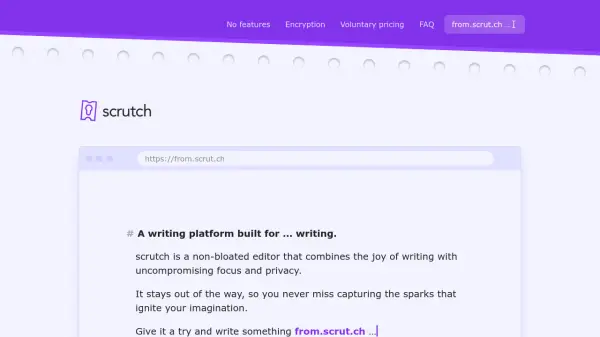
scrutch is a minimalist writing platform designed to provide an uncompromising focus on writing while ensuring complete privacy. It operates as a non-bloated editor that eliminates distractions, allowing users to capture ideas instantly without the overhead of traditional writing tools. The platform emphasizes simplicity and security, enabling writing from any browser at any time without requiring logins, cookies, or tracking.
All content entered into scrutch is end-to-end encrypted before leaving the user's device, ensuring that only the user and authorized parties can access the text. The encryption process generates unique slugs and keys for each text, with the clear text existing solely on the user's devices. This approach supports secure sharing through public and private URLs while maintaining privacy. scrutch uses Markdown for formatting and offers progressive web app support for offline access, making it a versatile tool for focused writing in a secure environment.
Features
- End-to-End Encryption: All content is encrypted client-side before leaving the device, ensuring only authorized users can access texts
- No Login Required: Users can start writing instantly without creating accounts or encountering cookie banners
- Markdown Support: Uses Markdown for text formatting instead of a rich-text editor, maintaining simplicity
- Progressive Web App: Offers browser-based access with offline support and PWA installation for mobile devices
- Voluntary Pricing: Operates on a pay-what-you-want model where users decide if and when to contribute financially
- No Tracking: Eliminates cookies, ads, and server-side knowledge of user content for enhanced privacy
- Secure Sharing: Allows sharing through public URLs with separate encryption keys or private URLs with embedded keys
- Focus-Oriented Design: Intentionally lacks features like themes, templates, folders, and AI to minimize clutter
Use Cases
- Quick note-taking and idea capture without setup barriers
- Secure journaling or personal writing with privacy protection
- Collaborative writing where encrypted sharing is required
- Drafting documents in distraction-free environments
- Mobile writing through progressive web app installation
- Temporary text storage with end-to-end encryption
- Writing practice or brainstorming sessions with minimal tools
- Educational use for teaching Markdown in a simple interface
FAQs
-
How does the encryption work in scrutch?
scrutch uses client-side symmetric encryption with AES-256, where each text has a unique encryption key generated on the user's device. The key is used to encrypt content before it leaves the device, and only users with the key can decrypt it. -
Can I recover my text if I lose the encryption key?
No, recovery is not possible because the encryption key never leaves the user's device. If lost, the content remains encrypted and inaccessible, so it's important to keep backups or share with other devices. -
Does scrutch offer spell or grammar checking?
No, scrutch does not include built-in spell or grammar checking to maintain privacy and simplicity. Users are recommended to use browser-based tools or extensions that work locally. -
Is scrutch available as a mobile app?
scrutch does not have native mobile apps but offers a progressive web app (PWA) that can be installed on Android and iOS devices for offline access and mobile writing. -
What happens if scrutch servers go down?
Users retain access to their texts because copies are stored on their devices. Sync between devices may pause until servers are back online, but local access remains available.
Related Queries
Helpful for people in the following professions
scrutch Uptime Monitor
Average Uptime
0%
Average Response Time
0 ms