What is MapPlug?
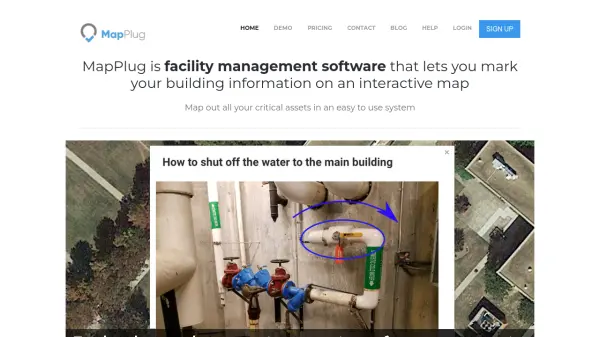
MapPlug is a comprehensive facility management software solution designed to centralize building information through interactive mapping technology. The platform allows users to upload floor plans and create customizable layers to mark critical assets such as water systems, gas lines, fire sprinklers, and electrical systems. By storing all data securely in the cloud, MapPlug provides mobile-friendly access from any device, enabling real-time management of building infrastructure.
The software includes features for creating detailed infographics with step-by-step instructions for handling emergencies, ensuring that anyone can respond effectively during crises. Users can control data access by setting specific permissions for different user types, from staff members to visiting technicians. MapPlug supports various property types including schools, office buildings, churches, and residential associations, making it a versatile tool for documenting and managing facility information efficiently.
Features
- Customizable Layers: Add standard layers like Water, Gas, Fire Sprinkler, and Electric, or create custom layers to fit specific needs
- Import Images: Easily upload floor plans and images with instructions for water systems, fire suppression, first aid services, and other critical assets
- Cloud-Based Storage: Securely store all building information in the cloud with protected AWS servers for access from anywhere
- Mobile Friendly: Responsive maps and infographics display beautifully on tablets, smartphones, laptops, and desktops
- Access Control: Set specific access levels for different users, including visitors and guests, to protect sensitive data
Use Cases
- Document building assets and floor plans for property management
- Create emergency response guides for building crises
- Centralize property information for facility handovers
- Provide limited access to visiting technicians for specific tasks
- Track building assets and maintenance records
- Organize emergency preparedness plans for natural disasters
- Manage multiple properties with different access levels
- Create step-by-step maintenance guides for building tasks
FAQs
-
How long is the free trial period?
Each new user gets a 30-day free trial with no credit card required, allowing full access to set up buildings and markers during this period. -
What type of floor plan files are supported?
The system requires PNG images of floor plans with transparent borders; PDF files can be converted to PNG format with assistance available. -
Is there any software installation required?
No installation is needed as MapPlug is web-based and accessible through browsers, with optional mobile apps in development. -
What happens to data if I cancel my subscription?
Data is retained unless deletion is requested per GDPR compliance; users can restart billing to regain access to their account information. -
How is data security maintained?
All data is stored on protected AWS servers with access controlled through user accounts and customizable permission levels.
Related Queries
Helpful for people in the following professions
MapPlug Uptime Monitor
Average Uptime
0%
Average Response Time
0 ms