
What is Dr.Fone?
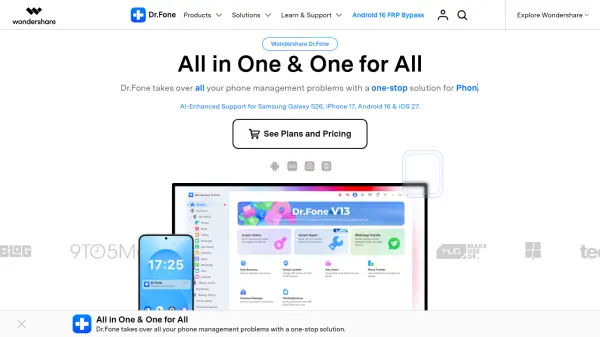
Dr.Fone is an all-in-one mobile device management platform developed by Wondershare that provides professional solutions for smartphone users and businesses. The toolkit addresses common mobile phone challenges including screen unlocking (Face ID, Apple ID, iCloud Lock, FRP bypass), data recovery from iOS and Android devices, system repair for various device issues, and seamless data transfer between different platforms. The software supports the latest devices including Samsung Galaxy S26, iPhone 17, Android 16, and iOS 27 with AI-enhanced capabilities.
The platform offers specialized modules for different needs, from recovering deleted photos and WhatsApp messages to permanently erasing data for privacy protection. Dr.Fone also includes advanced features such as GPS location changing, password management for iOS devices, wireless backup with incremental functionality, and screen mirroring to PC or Mac. With over 50 million active users and 150 million downloads, the software maintains zero-data-retention architecture with GDPR compliance and AES-256 encryption. Additional online tools provide FRP bypass for Samsung and Xiaomi devices, IMEI checking, and carrier SIM unlocking services without requiring software installation.
Features
- Screen Unlock: Remove lock screens, Face ID, Apple ID, iCloud activation lock, FRP, and carrier locks from iOS and Android devices
- Data Recovery: Recover deleted photos, videos, messages, WhatsApp chats, and files from iOS and Android devices including broken phones
- System Repair: Fix iOS and Android system issues including update problems, frozen screens, black screens, and boot loops
- WhatsApp Transfer: Transfer, backup, and restore WhatsApp, Viber, LINE, and WeChat data across platforms
- Phone Transfer: One-click data transfer between iOS and Android devices with support for local files and cloud backups
- Virtual Location: Change GPS location instantly on iOS and Android devices for location-based apps
- Data Manager: Organize and manage 30+ data types including photos, music, videos, messages, and contacts from PC
- Wireless Backup: Create incremental backups for up to 24 data types without cables for Android and iOS
- Screen Mirror: Mirror phone screen to PC or Mac with real-time recording and high-quality screenshots
- iOS Password Manager: Find and retrieve Apple ID, Wi-Fi, app, web, email, and Screen Time passwords
Use Cases
- Unlock forgotten screen passwords on iPhone or Android devices
- Bypass FRP lock on Samsung, Xiaomi, Vivo, and other Android devices
- Recover accidentally deleted photos and videos from smartphones
- Transfer WhatsApp chat history when switching from iPhone to Android or vice versa
- Fix iPhone stuck on Apple logo or Android boot loop issues
- Remove iCloud activation lock from second-hand iPhones
- Backup phone data wirelessly to computer without cables
- Change GPS location for privacy or accessing geo-restricted content
- Permanently erase data before selling or giving away old phones
- Mirror phone screen to computer for presentations or demonstrations
- Retrieve forgotten Wi-Fi passwords stored on iOS devices
- Transfer all data from old phone to new phone in one click
- Recover WhatsApp messages after accidental deletion or phone damage
- Remove Apple ID from iPhone without password
- Unlock carrier-locked phones to use with any network provider
How It Works
Download and Install Dr.Fone
Download the Dr.Fone toolkit from the official website and install it on your Windows PC or Mac. Launch the application and select the specific tool you need from the main interface.
Connect Your Device
Connect your iOS or Android device to your computer using a USB cable or wirelessly if supported. The software will automatically detect your device and display its information.
Select Your Operation
Choose the specific operation you want to perform, such as screen unlock, data recovery, system repair, or data transfer. Follow the on-screen instructions specific to your chosen function.
Complete the Process
Allow Dr.Fone to complete the selected operation. The time required will vary depending on the task. Once finished, you can review the results and disconnect your device safely.
FAQs
-
What devices does Dr.Fone support?
Dr.Fone supports both iOS and Android devices, including the latest models such as iPhone 17, Samsung Galaxy S26, and devices running Android 16 and iOS 27. It works with various brands including Samsung, Xiaomi, Vivo, Redmi, Poco, Huawei, and more. -
Can Dr.Fone recover data from broken phones?
Yes, Dr.Fone includes a Broken Android Recovery feature that can recover data from Android phones with broken screens, black screens, or other physical damage. It can also recover various types of data including photos, messages, contacts, and WhatsApp chats. -
Is Dr.Fone safe to use for unlocking devices?
Dr.Fone uses zero-data-retention architecture, is GDPR compliant, and employs AES-256 encryption for security. The software has received a 2026 Gold Award in Data Security and has been used for over 9.5 million secure operations. -
Can I transfer WhatsApp data between iPhone and Android?
Yes, Dr.Fone's WhatsApp Transfer feature allows you to transfer, backup, and restore WhatsApp messages and attachments between iOS and Android devices. It also supports Viber, LINE, and WeChat data transfer. -
Does Dr.Fone require technical knowledge to use?
No, Dr.Fone is designed to be user-friendly with step-by-step guides and video walkthroughs. The software provides clear instructions for each feature, and customer support is available to assist users through email and chat if needed.