ReddRadar

What is Advanced Renamer?
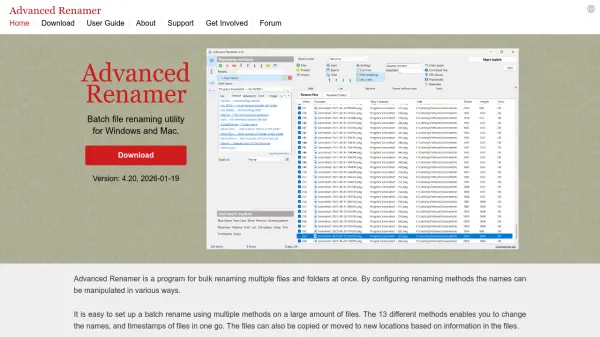
Advanced Renamer is a comprehensive batch file renaming utility designed for Windows and macOS. It allows users to rename multiple files and folders at once by configuring various renaming methods. The tool supports 13 different methods to manipulate file names and timestamps, including adding, removing, replacing, changing case, and constructing new names based on file metadata. Users can preview changes in real-time, undo batches, and automate processes through a command-line batch runner.
The program extracts metadata from a wide range of file formats, such as images (EXIF, XMP), music (ID3), videos, and documents, to generate meaningful file names. It supports features like GPS data integration for location-based naming, regular expressions, wildcards, and JavaScript scripting for advanced customization. With support for Unicode and UTF8, it handles diverse file types efficiently, making it ideal for organizing digital media and documents.
Features
- Supports both Windows and macOS: Compatible with major operating systems for broad accessibility
- Preview new names in real time: Allows users to verify changes before applying them to avoid errors
- Image renaming with EXIF and XMP support: Extracts metadata from image files for context-based naming
- Rename with MP3 / ID3 metadata information: Uses music file tags to organize audio tracks efficiently
- Use Regular expressions and Wildcards: Provides flexible pattern matching for advanced renaming tasks
- Generate new file names from JavaScript: Enables custom scripting for complex renaming operations
- Rename with video tags: Incorporates video metadata like codec and resolution into file names
- Use GPS information from image files: Adds location-based details such as city or country names from embedded GPS data
- Undo previous batches: Allows reversal of renaming operations if mistakes occur
- Automate renaming with command line batch runner: Supports automation for repetitive tasks through scripts
Use Cases
- Organizing digital photos by renaming them based on EXIF metadata like date and camera model
- Streamlining music file management by using ID3 tags to create structured file names
- Enhancing video file organization by including technical details such as resolution and frame rate in names
- Cleaning up file names by removing unwanted characters or spaces for web-safe usage
- Adding incrementing numbers with leading zeros to filenames for systematic sorting
- Copying or moving files to new folders based on constructed names from file tags and patterns
- Reverting file names to original versions if a renaming batch goes wrong
- Using GPS data from images to add geographic location names like city or country to file names
- Automating batch renaming processes through command-line scripts for workflow integration
- Enforcing consistent naming conventions across files to improve organization and categorization
FAQs
-
What operating systems does Advanced Renamer support?
Advanced Renamer supports both Windows and macOS operating systems. -
Can I preview file name changes before applying them?
Yes, Advanced Renamer allows real-time preview of new file names to verify changes before execution. -
Does Advanced Renamer support undoing renaming batches?
Yes, it includes an undo feature to revert previous batches if mistakes occur. -
What types of file metadata can Advanced Renamer extract?
It extracts metadata from various formats, including EXIF and XMP from images, ID3 from music files, and tags from videos and documents. -
Can I automate renaming tasks with Advanced Renamer?
Yes, automation is possible through the command-line batch runner for scripting repetitive tasks.
Related Queries
Helpful for people in the following professions
Advanced Renamer Uptime Monitor
Average Uptime
0%
Average Response Time
0 ms