ReddRadar

What is ZipKing?
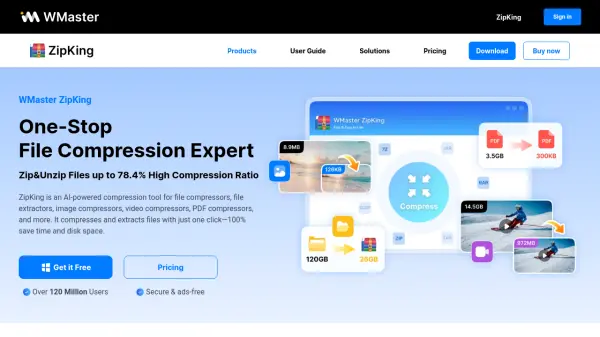
ZipKing is an advanced AI-powered file compression and extraction tool designed to enhance efficiency by reducing file sizes while maintaining original data quality. It leverages state-of-the-art AI algorithms for hyper compression, enabling users to compress and decompress a wide range of file formats including images, videos, PDFs, audio files, office documents, and more, all in bulk and with a single click. The platform’s parallel processing capabilities enable rapid handling of large and batch files, streamlining workflows for both personal and professional applications.
ZipKing further features robust security through 256-bit AES encryption and decryption, customizable file splitting and size options, and intelligent encoding error repair for compressed file names. With a user-friendly interface offering drag-and-drop, right-click functionality, and direct file previews, it integrates seamlessly into the user's digital workspace. Lifetime access with a one-time payment ensures supreme cost-effectiveness for long-term file management needs.
Features
- High Compression Ratio: Compress files up to 78.4% with no quality loss.
- Bulk Compression/Extraction: Batch process multiple files and large file types efficiently.
- Multi-Format Support: Compress and decompress over 61 file formats, including Zip, 7z, RAR, TAR, PDF, DOCX, MP3, and more.
- AI Algorithms: Utilizes advanced AI for accelerated compression and decompression.
- 256-bit AES Encryption: Secure files with password protection during compression.
- File Splitting & Customization: Easily divide large files into customizable sizes for transfer and storage.
- Lossless Image, Audio, and Video Compression: Maintain original quality after compression.
- Drag-and-Drop & Right-Click Operations: Simplify file management and workflow.
- File Preview and Management: Open and preview compressed files without decompressing.
- Automatic Encoding Error Repair: Detect and repair encoding errors in compressed file names.
Use Cases
- Compressing large video files for easier online sharing and storage
- Reducing the size of PDF and office documents for email attachments
- Batch compressing and converting images for website optimization
- Securing sensitive data with file encryption during transfer or storage
- Decompressing archived files received in formats like ZIP, RAR, or 7z
- Splitting oversized files for upload to platforms with file size limits
- Optimizing audio file storage through bulk compression
- Custom resizing and compression of passport, visa, or ID photos
FAQs
-
What operating systems are supported by ZipKing?
ZipKing is compatible with Windows 11, 10, 8, and 7 (64-bit). -
Does ZipKing support bulk file compression and extraction?
Yes, ZipKing supports batch compression and extraction for multiple file formats and types. -
Is the compression lossless for images, audio, and videos?
ZipKing provides lossless compression for images, audio, and videos, ensuring no quality loss after processing. -
How secure is file encryption with ZipKing?
ZipKing uses 256-bit AES encryption to ensure files are securely password-protected during compression. -
What kind of files can ZipKing compress and extract?
ZipKing supports over 61 file formats, including ZIP, 7z, RAR, TAR, GZip, JAR, PDF, DOCX, MP3, and more.