ReddRadar

What is x64dbg?
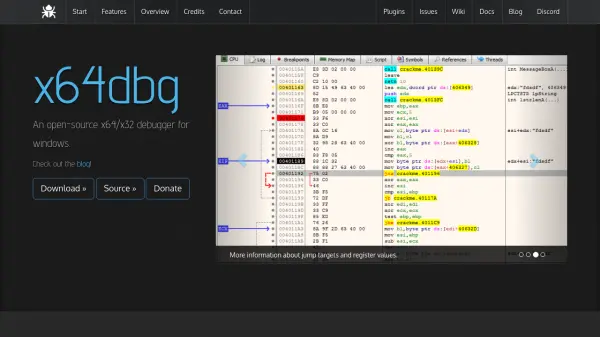
x64dbg is an open-source debugger designed for Windows, capable of debugging both x64 and x32 applications through a single, user-friendly interface. It offers a fully customizable color scheme and themes, along with an IDA-like sidebar with jump arrows and instruction token highlighting for enhanced code analysis. The tool integrates a C-like expression parser, a fast disassembler powered by Zydis, and a built-in assembler using XEDParse and asmjit, making it versatile for various debugging tasks.
Built on open-source libraries such as Qt, TitanEngine, and Scylla, x64dbg supports features like memory mapping, symbol viewing, thread analysis, and source code visualization. It includes a user database in JSON format for comments, labels, and bookmarks, and provides plugin support with an extendable API for customization. The debugger also incorporates an ASM-like scripting language for automation, basic PDB support for debug symbols, and executable patching capabilities, all under active development with community contributions.
Features
- Open-source: Fully accessible source code under GPLv3 license for contributions and customization
- Dual Architecture Support: Debugs both x64 and x32 applications with a unified interface
- Plugin Support: Extendable API for adding script commands and integrating external tools
- Scriptable Automation: Integrated, debuggable ASM-like scripting language for automating debugging tasks
- Customizable Interface: Fully adjustable color schemes and themes for personalized user experience
- Memory Analysis: Includes memory map, symbol view, thread view, and dynamic stack view for comprehensive debugging
- Disassembly and Assembly: Fast disassembler using Zydis and built-in assembler with XEDParse/asmjit
- User Database: JSON-based storage for comments, labels, bookmarks, and other annotations
Use Cases
- Debugging executable files (EXE) and dynamic link libraries (DLL) on Windows
- Reverse engineering applications for security analysis or software development
- Automating debugging tasks through scripting for efficiency in repetitive processes
- Analyzing memory usage and thread behavior in running applications
- Patching executables for modifications or fixes during development or testing
- Visualizing code structure with graph views and source code integration for better understanding
FAQs
-
What operating systems does x64dbg support?
x64dbg is designed specifically for Windows operating systems. -
Can x64dbg debug both 64-bit and 32-bit applications?
Yes, x64dbg supports debugging of both x64 and x32 applications through a single interface. -
Is x64dbg open-source and can I contribute to its development?
Yes, x64dbg is open-source under the GPLv3 license, and contributions are welcome through its source code repository. -
Does x64dbg support plugins for extending its functionality?
Yes, x64dbg offers plugin support with an extendable API, allowing users to add custom script commands or integrate other tools. -
What scripting language does x64dbg use for automation?
x64dbg includes an integrated, debuggable ASM-like scripting language for automating debugging tasks.