ReddRadar
What is REW (Room EQ Wizard)?
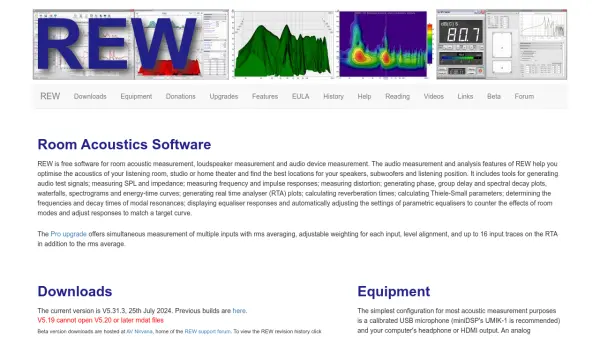
REW (Room EQ Wizard) is a comprehensive acoustic measurement software designed for optimizing room acoustics in various audio environments. This free software provides tools for measuring and analyzing audio characteristics to help users achieve optimal sound quality in their listening spaces.
The software includes capabilities for generating test signals, measuring SPL and impedance, analyzing frequency and impulse responses, and calculating distortion. It generates detailed visualizations including phase plots, group delay charts, spectral decay plots, waterfalls, spectrograms, and energy-time curves. Additional features include real-time analyzer plots, reverberation time calculations, Thiele-Small parameter determination, modal resonance analysis, and equalizer response optimization.
Features
- Acoustic Measurement: Comprehensive tools for measuring room acoustics, loudspeaker performance, and audio device characteristics
- Signal Generation: Capability to generate audio test signals for measurement purposes
- Visual Analysis: Generation of phase plots, group delay charts, spectral decay plots, waterfalls, spectrograms, and energy-time curves
- Real-time Analysis: Real-time analyzer (RTA) plots for immediate feedback during measurements
- Equalizer Optimization: Tools for displaying equalizer responses and automatically adjusting parametric equalizer settings to counter room modes
Use Cases
- Optimizing acoustics in home theater systems
- Improving sound quality in recording studios
- Finding optimal speaker placement in listening rooms
- Measuring loudspeaker performance characteristics
- Analyzing room modes and acoustic resonances
- Setting up and calibrating audio systems
FAQs
-
What operating systems does REW support?
REW supports Windows (11/10/8/7/Vista/XP), macOS (10.15 and later), and Linux (AMD64). -
What equipment is needed to use REW for acoustic measurements?
The simplest configuration is a calibrated USB microphone (such as miniDSP's UMIK-1) and your computer's headphone or HDMI output. For analog microphones, an interface with mic preamp and phantom power is required. -
Is there a professional version of REW available?
Yes, REW offers a Pro upgrade that provides simultaneous measurement of multiple inputs with rms averaging, adjustable weighting for each input, level alignment, and up to 16 input traces on the RTA in addition to the rms average. -
Where can I find help and support for using REW?
REW includes comprehensive help files within the software, available online, and downloadable as HTML or PDF files. Additional support is available through the AV NIRVANA REW forum. -
Does REW support multiple languages?
Yes, REW help files are available in English, French, Chinese, Italian, German, and Korean through various translations and video tutorials.
Related Queries
Helpful for people in the following professions
REW (Room EQ Wizard) Uptime Monitor
Average Uptime
0%
Average Response Time
0 ms