What is PhotoVortex?
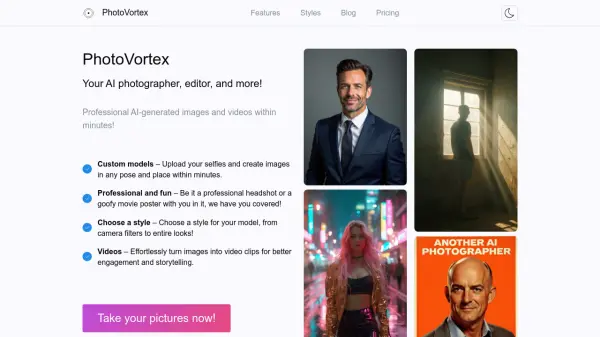
PhotoVortex is an AI-powered platform that enables users to create professional-grade images and videos of themselves without the need for a photographer or studio. By uploading a set of selfies, users can train a custom AI model that learns their likeness, allowing them to generate images in any pose, place, or style—from photorealistic portraits to artistic paintings and fun themed looks. The platform offers a variety of pre-defined styles, such as Victorian Era Photography, Impressionist Painting, and Retro Sci-Fi, and also supports custom prompts for advanced personalization on Pro and Premium plans.
Beyond static images, PhotoVortex provides AI video generation, turning images into 5-second video clips for enhanced storytelling and engagement. Users can easily create headshots, LinkedIn teasers, team photos, and even AI influencers. The service operates on a credit-based system with monthly subscription plans, offering different credit allowances and model training limits. With support for email and Google login, PhotoVortex aims to make professional and creative AI-generated media accessible to everyone.
Features
- Custom AI Model Training: Upload selfies to train a personalized AI model that generates images of you in any style.
- Pre-defined Styles: Choose from a variety of artistic and thematic styles such as Photorealistic, Impressionist Painting, and Retro Sci-Fi.
- AI Video Generation: Turn your images into 5-second video clips with custom prompts for dynamic storytelling.
- Custom Prompts: Pro and Premium users can use their own text prompts to further customize generated images.
- Multiple Image Operations: Supports HD image generation, filters, and various creative edits with a credit-based pricing system.
Use Cases
- Create professional LinkedIn headshots without a photographer.
- Generate fun social media profile pictures in unique artistic styles.
- Produce team photo shoots for corporate websites or marketing materials.
- Develop consistent AI influencers for social media or brand marketing.
- Craft personalized video content for engagement on social platforms.
- Design movie-style posters or themed portraits for personal entertainment.
FAQs
-
What types of photos should I upload to train a model?
Ideally, upload photos taken from different angles, distances, and backgrounds. Mix selfies, portraits, and full-body shots. We recommend at least 10, better yet 20 photos for best results. Avoid photos where your face is obstructed or group photos with other people. -
How long does it take to train a model?
Training time is typically around 5-20 minutes, though often faster. The more photos you upload, the longer it takes, but the better the results. -
How long does it take to generate an image?
Generating an image takes about 10-20 seconds per image. You can queue multiple images to be generated at once. -
Can I create videos with PhotoVortex?
Yes, you can create 5-second videos by selecting an image and using the video tab. Provide a prompt to instruct the AI on the scene development. -
Can I cancel my subscription at any time?
Yes, you can cancel anytime from your profile page. Your access will end at the end of the current payment period. Unused credits are non-refundable.
Helpful for people in the following professions
PhotoVortex Uptime Monitor
Average Uptime
0%
Average Response Time
0 ms