ReddRadar

What is PassbackAI?
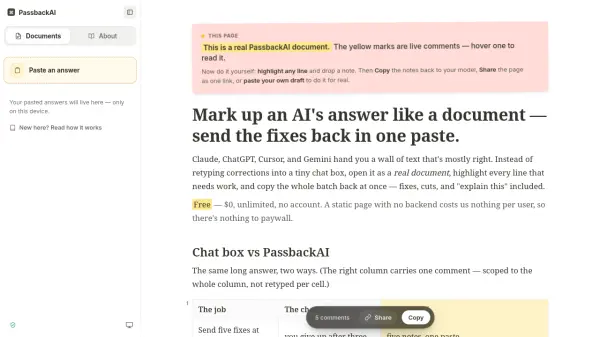
PassbackAI transforms AI-generated text into editable documents where users can highlight specific lines, attach comments, and batch all corrections into a single copyable block. Instead of struggling with small chat boxes to provide feedback one correction at a time, users paste long AI responses into PassbackAI, mark every passage that needs revision, and copy the entire collection of notes back to their AI model in one action. Each comment anchors to exact words and remembers its context, ensuring the AI understands precisely what to change and where.
The platform operates entirely in the browser with no backend infrastructure, meaning documents stay private in local storage and never upload to servers. Users can share marked-up documents via encoded links that contain all content in the URL fragment, with optional password encryption for sensitive materials. PassbackAI includes an auto-diff feature that compares successive drafts and highlights exactly what changed, plus supports multi-draft workflows through a sidebar bench system that holds recent documents.
Features
- Inline Commenting: Highlight any line in AI-generated text and attach notes directly to specific passages
- Batch Copy: Bundle all comments with their quoted text and context into a single copyable block for AI models
- Auto-Diff: Automatically compare successive draft versions and highlight exactly what changed between them
- Zero Backend Privacy: All documents stored locally in browser localStorage with no uploads or server storage
- Link-Based Sharing: Share entire marked-up documents via encoded URLs with optional password encryption
- Multi-Draft Management: Work on multiple documents simultaneously through a sidebar bench system
- Context Anchoring: Each note remembers its heading and exact quote location for precise AI feedback
- Chrome Extension: Load copied AI answers directly into PassbackAI with one click
Use Cases
- Annotating long Claude or ChatGPT responses with multiple corrections before sending feedback
- Collaborating on AI-generated content by sharing marked-up documents with teammates via link
- Tracking changes between AI draft iterations to verify specific fixes were implemented
- Marking confusing passages in AI output to request explanations for all unclear sections at once
- Editing code generated by Cursor with line-specific comments and change requests
- Creating question questionnaires from project briefs before AI generates assumptions
- Reviewing AI-generated documentation with team members without creating accounts
- Providing precise feedback on AI writing by anchoring notes to exact sentences
How It Works
Paste your AI response
Copy a long answer from Claude, ChatGPT, Cursor, or Gemini and paste it into PassbackAI to transform it into an editable document.
Mark every fix where it lives
Highlight any line, drop a note, and keep reading. Each note stays pinned to the exact words and remembers the heading above it so the model learns what to change and where.
Copy all edits back in one paste
Hit Copy and every note bundles with its quote into a single block your model can act on, with all corrections anchored to their exact locations.
Paste the next version and see changes
Paste the model's new version and PassbackAI lines it up against the last one and highlights exactly what changed, so you confirm fixes landed without re-reading the whole answer.
FAQs
-
Why does the AI model keep rewriting the wrong paragraph?
Chat boxes can carry your sentence but not your finger pointing at it. When you type 'fix the third bullet' in prose, the model has nothing to point at and rewrites a paragraph that merely sounds close. PassbackAI marks the actual passage with verbatim quotes and heading context, so the model lands on one specific target instead of guessing. -
Where does my draft go and is it saved anywhere?
Drafts wait locally in your browser while you work and roll off the bench automatically as newer drafts come in. You can pin one to keep it longer. Nothing is uploaded, archived, or sent to a server. The text is ephemeral by design, with no backend or database. -
How does sharing work with no server?
One click encodes the whole document, including text and your marks, inside the link itself in the URL fragment that browsers never send to servers. Your colleague opens it with no login, adds their own notes, and passes it back. You can add a password for encryption so the link unlocks only for people you tell. -
Does PassbackAI work with Claude, ChatGPT, Cursor, and Gemini?
Yes, any chat that takes Markdown in and out works. You paste the AI answer, mark the fixes, then copy the block back into the same chat. There is also a Chrome extension that loads your copied answer in one click, skipping the paste step entirely. -
Can I work on more than one draft at once?
Yes, your recent drafts sit on the bench (the last twenty, most-recent first), and you switch between them from the sidebar. Each waits locally while you work it. Pin the one you are not done with so it stays put.
Helpful for people in the following professions
PassbackAI Uptime Monitor
Average Uptime
0%
Average Response Time
0 ms