ReddRadar

What is INSSIST?
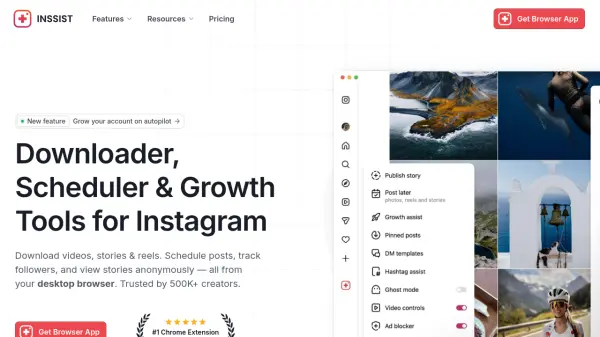
INSSIST functions as a comprehensive web assistant for Instagram, operating directly within the browser as a Chrome extension. It provides a suite of tools designed to enhance the desktop Instagram experience, enabling users to manage their accounts more efficiently without relying on the mobile app. The extension integrates seamlessly with Instagram.com, offering a native interface with added functionalities for content creation, scheduling, and audience growth.
The platform focuses on privacy and user control, with features that allow for anonymous story viewing, content downloading, and automated engagement to attract real followers. It supports various content types including posts, stories, reels, and carousels, with scheduling capabilities to maintain a consistent posting schedule. By working directly within Instagram's web environment, INSSIST avoids API limitations common in third-party social media management tools, providing full feature access and eliminating the need for frequent account reconnections.
Features
- Content Downloader: Save Instagram photos, videos, stories, and reels directly to your device
- Post Scheduling: Plan and schedule posts, stories, and reels to publish automatically at optimal times
- Growth Autopilot: Automatically engage with potential followers to grow your account organically
- Follower Tracking: Monitor unfollowers, export follower lists, and detect bot accounts
- Anonymous Story Viewer: View Instagram stories privately without the account owner knowing
- Desktop Publishing: Upload stories, reels, and carousels directly from your computer browser
- Hashtag Management: Access hashtag assist tools and metrics to optimize content reach
- Multi-Account Support: Manage multiple Instagram accounts with switching capabilities
Use Cases
- Scheduling Instagram content in advance for consistent posting
- Downloading Instagram videos and stories for content curation
- Growing Instagram followers organically through automated engagement
- Tracking unfollowers and analyzing follower demographics
- Viewing Instagram stories anonymously for research purposes
- Managing multiple Instagram accounts from a desktop browser
- Reposting Instagram content with proper attribution
- Planning Instagram content calendars and grid layouts
FAQs
-
How do I install the INSSIST extension?
Navigate to the Chrome Web Store, click 'Add to Chrome,' then open Instagram.com and locate the Assistant+ button on the side panel. -
Is INSSIST safe for my Instagram account?
Yes, it is privacy-centered and does not store credentials, passwords, or browser data, growing accounts organically without fake profiles. -
Can I view stories without being detected?
Yes, the anonymous story viewer allows private browsing of Instagram stories from a desktop browser. -
How does INSSIST compare to Hootsuite or Buffer?
It works directly within Instagram.com as a Chrome extension, offering full feature access without API limitations or account reconnection issues. -
Can I download content from private accounts?
Yes, the downloader works for any public or private account you follow, saving videos, reels, stories, and photos.