ReddRadar
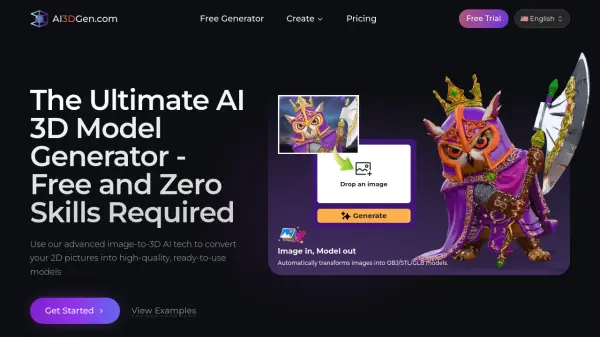
What is AI3DGen?
AI3DGen is an advanced, cloud-based platform that uses artificial intelligence to automatically transform 2D images into production-ready 3D models. Powered by machine learning models trained on millions of professional assets, the platform accurately reconstructs geometry, depth, and surface detail from a single uploaded photo. Users can choose from three generator tiers: Base, Pro, and Ultra, each offering progressively higher mesh fidelity, PBR texture quality, and processing priority. The entire process takes approximately 60 to 180 seconds and requires no software installation, no technical expertise, and no credit card to get started on the free plan.
The platform exports models in universally compatible formats including.GLB, .OBJ and STL, making them ready for immediate use in tools such as Blender, Unity, and Unreal Engine. Paid plans unlock high-resolution PBR textures, flexible face counts, customizable generation settings, unlimited daily generations, and a commercial license suitable for games, film, product design, VR/AR development, and 3D printing workflows. AI3DGen also includes supplementary tools such as an AI image editor and a background remover, further streamlining the asset creation pipeline.
Features
- Image-to-3D Conversion: Automatically transforms JPG, PNG, or WebP images into 3D models in approximately 60–180 seconds.
- Three Generator Tiers: Base, Pro, and Ultra generators offer progressively higher mesh detail, texture quality, and processing priority.
- High-Fidelity PBR Textures: Pro and Ultra plans generate detailed physically based rendering (PBR) textures and clean UV maps for photorealistic results.
- Multi-Format Export: Download generated models in .GLB, .OBJ, and .STL formats for seamless integration into Blender, Unity, Unreal Engine, and other tools.
- Adjustable Face Count: Choose from 5K to 40K face counts to control mesh complexity based on your project needs.
- Commercial License: All paid plans include a commercial license for use in games, NFTs, advertising, and other commercial projects.
- Cloud-Based Platform: Fully browser-based with no downloads or installations required.
- Supplementary AI Tools: Includes an AI image editor and a background remover to streamline the asset preparation workflow.
- Secure & Private: Uploaded images and generated models are kept confidential and never shared publicly or used for training without permission.
- Credit-Based System: Flexible credit packs available for users who need additional generations without upgrading their subscription.
Use Cases
- Game developers generating low-poly or high-detail character and prop assets from concept art or photos.
- E-commerce sellers converting product photos into interactive 3D models for online stores.
- 3D printing enthusiasts turning hand-drawn designs or photographs into printable STL files.
- VR/AR developers creating 3D scene assets from 2D reference images.
- Architects and designers rapidly prototyping spatial concepts from site photos.
- STEM educators scanning student drawings to produce printable 3D models for hands-on learning.
- Film and animation studios quickly generating detailed assets for production pipelines.
- Digital artists and cosplay creators testing and refining 3D prop designs before printing.
- Archaeologists and researchers digitizing physical artifacts from photographs for academic publications.
- Indie developers and hobbyists prototyping ideas without needing advanced 3D modeling skills.
How It Works
Upload Your Image
Upload a JPG, PNG, or WebP image. For best results, use a clear, well-lit photo of a single object against a plain or simple background so the AI can focus on your subject.
Generate Your Model
Click 'Generate' and let the AI analyze the image's geometry, depth, and details. The AI constructs a 3D mesh and applies textures based on the input. This process typically takes 60 to 180 seconds.
Export & Use
Once generation is complete, download your model in .GLB, .OBJ, or .STL format and import it directly into Blender, Unity, Unreal Engine, or your preferred 3D software or 3D printer.
FAQs
-
Can I use AI3DGen without creating an account?
Yes. The free generator requires no sign-up. You can upload an image and generate a 3D model immediately without creating an account or providing a credit card. -
What image formats are supported for 3D conversion?
AI3DGen supports JPG, PNG, and WebP image formats. For best results, use a high-resolution image with a clear subject and a plain or transparent background. -
Can I use the generated 3D models for commercial projects?
Yes. All paid plans include a Commercial License, allowing you to use generated models for games, NFTs, advertising, and other commercial projects without restrictions. -
How does the credit system work?
Each generation consumes credits: Base Generation costs 20 credits, Pro Generation costs 40 credits, Ultra Generation costs 60 credits, AI Image Editing costs 14 credits, and Background Remover costs 1 credit. Additional credits can be purchased via the Credit Pack page. -
Do unused credits roll over to the next month?
No. Credit allowances reset on the billing renewal date each month. Unused credits from the previous cycle do not roll over.
Helpful for people in the following professions
AI3DGen Uptime Monitor
Average Uptime
0%
Average Response Time
0 ms